The National Examinations Council, NECO has announced the release of the 2023 SSCE External Examination Result. Outlined below is how to check NECO results.
The Registrar and Chief Executive of NECO, Prof. Dantani Ibrahim Wushishi communicated this in a public address on Monday, 26th February 2024.
NECO Result Checker
Candidates who sat for the 2023 external examination are to visit the NECO portal to access their results.
Steps to Checking the Result
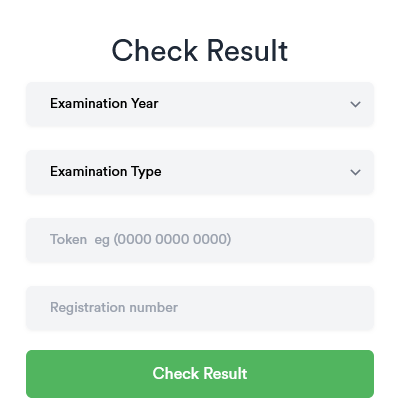
Step 1: Choose the examination year which in this case, is 2023.
Step 2: Indicate the type of examination, whether internal or external, in this instance, it is external.
Step 3: Fill in the token or pin number for checking the result.
Step 4: Type your registration number
Step 5: Click check result. The system will display your result.
The Token/Pin can be used to check your result for five times. After that, you will not need to purchase another token for further checks. You can visit the NECO e-verify platform and follow the steps to verify your results.
Read more details on how to use the newly introduced NECO e-verify platform to verify your result.
What to do if you don’t have a token
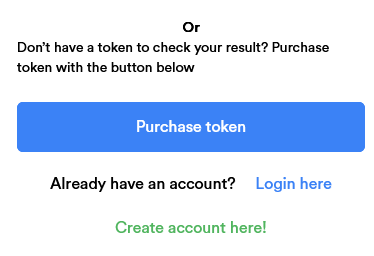
If you have lost your token/pin for checking the result, you can purchase the token from the same platform used for retrieving the result.
This is how you can purchase a token.
Step 1: Create an account on the NECO Platform by providing a valid and working email address as username. Also create a password.
Step 2: Log in with your user name and password.
Step 3: Click on purchase token on the dashboard
Step 4: Follow the prompts till your payment is successfully made.
Step 5: Return to your NECO dashboard where you can view the token.
Step 6: Use the token to check your result.
The cost of the NECO Token is N1,267.16 including the payment gateway charges.
Note: If you have already used a token to check your NECO result but now lost it, you may NOT purchase a new token to check same result. You have to proceed to the NECO e-verify platform, register, apply and wait for the verification of your result.
You can also read how to check your WAEC result and purchase pin.